This configuration worked for me, you might need to change things around
Keep in mind I have an AMD CPU and Nvidia GPU, if you have other config, you might have to use different commands
After upgrading Proxmox to 7.2, passthrough wasn't working. To make it work again try resetting your graphics card: [Resetting GPU](https://wiki.tozo.info/books/server/page/resetting-gpu "Resetting GPU") OR keep reading, the GRUB parameters have to be changed to make it work again with the latest kernel!
##### Configuring BIOS Before doing anything make sure virtualization and IOMMU is enabled in your BIOS, you can't do anything bofore that. If your motherboard doesn't support IOMMU, then you can't pass through PCI(e) devices to your VMs. ##### Update the Host configuration Login to the host and open `/etc/default/grub`. Find the line `GRUB_CMDLINE_LINUX_DEFAULT` and change it from: ```bash GRUB_CMDLINE_LINUX_DEFAULT="quiet" ``` to ```bash GRUB_CMDLINE_LINUX_DEFAULT="quiet iommu=pt nofb nomodeset initcall_blacklist=nvidiafb_init" ``` Run `update-grub` to append the grub's content to all linux entries in `/boot/grub/grub.cfg`. Next go to `/etc/modules-load.d`, create a file there called `vfio.conf` and add the followings: ```bash vfio vfio_iommu_type1 vfio_pci ``` After these changes run the below to refresh the `initramfs`, then restart your server: `update-initramfs -u -k all` Once it's restarted, run the below commands to check if IOMMU was successfully enabled: ```bash dmesg | grep -e DMAR -e IOMMU -e AMD-Vi ``` It should display that `IOMMU, Directed I/O or Interrupt Remapping is enabled` or something similar, it could be different on your hardware. Also check that the devices are in different IOMMU groups: ```bash find /sys/kernel/iommu_groups/ -type l ``` ##### Device passthrough setup First find the device Ids that you want to passthrough. Run ```bash lspci -nn ``` which will display all the devices and their Ids in the host. Find yours and write it down. It looks something like `[1245:4f5a]`, don't forget the copy the audio device's Id + USB Ids as well Since we want to use a GPU in our VM, we have to passthrough all the devices. You also have to blacklist your GPU so the host won't utilize it. This is how my `/etc/modprobe.d/pve-blacklist.conf` looks like: ```bash # This file contains a list of modules which are not supported by Proxmox VE # nidiafb see bugreport https://bugzilla.proxmox.com/show_bug.cgi?id=701 blacklist nvidia blacklist nouveau blacklist nvidiafb blacklist i2c_nvidia_gpu blacklist nova_core ``` Then in your `/etc/modprobe.d/vfio.conf` insert: ```bash options vfio-pci ids=10de:2187,10de:1aeb,10de:1aec,10de:1aed ``` Here the Ids are the ones which you copied previously. Also create `/etc/modprobe.d/kvm.conf` with the below content: ```bash options kvm ignore_msrs=1 ``` This will allow to use Nvidia cards on Windows when you set the CPU to host. Create `/etc/modprobe.d/vfio-priority.conf` with this content: ``` softdep nouveau pre: vfio-pci softdep nvidia pre: vfio-pci softdep nvidiafb pre: vfio-pci softdep nova_core pre: vfio-pci softdep xhci_pci pre: vfio-pci ``` This is so that the drivers are loaded in the proper order. Apply these changes: `update-initramfs -u -k all` then restart the host. At this point your host should be ready. ##### Creating VM [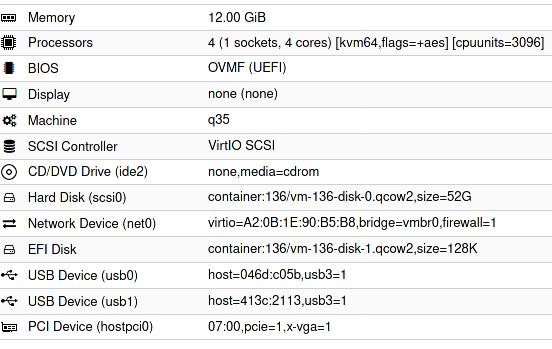](https://wiki.tozo.info/uploads/images/gallery/2022-04/cSocxRzpK1U0hQr0-image-1651343431383.png) Configuration in a text format: ``` bios: ovmf bootdisk: scsi0 cores: 4 cpu: kvm64,flags=+aes cpuunits: 3096 efidisk0: container:136/vm-136-disk-1.qcow2,size=128K hostpci0: 07:00,pcie=1,x-vga=1 ide2: none,media=cdrom machine: q35 memory: 12288 name: ubuntu8 net0: virtio=A2:0B:1E:90:B5:B8,bridge=vmbr0,firewall=1 numa: 0 ostype: l26 scsi0: container:136/vm-136-disk-0.qcow2,size=52G scsihw: virtio-scsi-pci smbios1: uuid=b925668d-9785-4941-ab36-4151164248c7 sockets: 1 usb0: host=046d:c05b,usb3=1 usb1: host=413c:2113,usb3=1 vga: none vmgenid: 9aae2c4f-30ff-4a2b-ac56-805e49c670d5 ``` - The `07:00` is my GPU set to `hostpci0` - vga has to be set to null - cpu can be kvm64, it doesn't have to be host - I set cpuunits to higher than default so proxmox will prioritize this VM